Best Scan Tool For Ford: Compare FORScan and Diagnostic Scanners
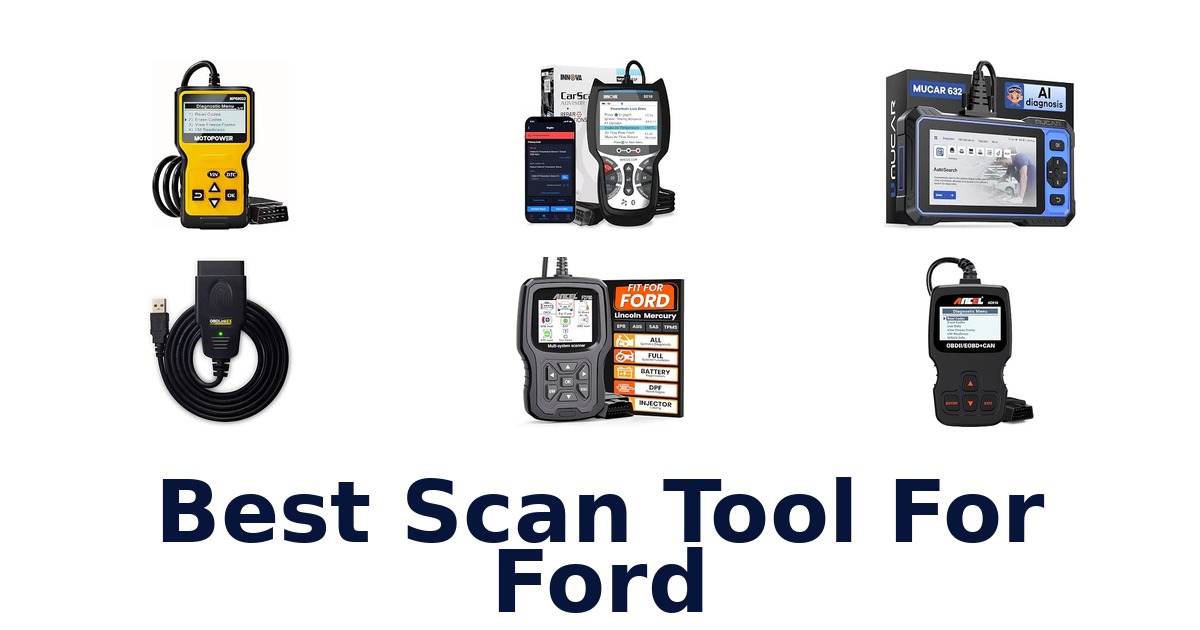
A strong scan tool for Ford should match the diagnostics you need: OBDLink EX is built for FORScan and Ford network access, while ANCEL FD700 targets Ford, Lincoln, and Mercury vehicles with full-system functions. This roundup compares those focused options with general-purpose scanners, including bidirectional models and basic engine-code readers. The key distinction is scope: an engine-only reader can help investigate a check-engine light, but it is not a substitute for a tool that can access other modules.
Check the product’s supported functions and your vehicle’s requirements before buying; the supplied listings do not establish compatibility with every Ford model or year. The rankings prioritize Ford-specific fit, then listed capabilities and hardware details, so you can narrow the choice to your intended jobs.
OBDLink EX is the leading choice because it is designed for FORScan, is recommended by the FORScan team, and supports Ford protocols, modules, and advanced FORScan features. Its electronic switch accesses HS-CAN, MS-CAN, and J1850 Ford networks, avoiding the manual switching used by toggle-switch adapters. Choose it if you plan to use FORScan on Windows and want broad Ford network access.
For a standalone Ford-family scanner with listed full-system functions, ANCEL FD700 is a strong alternative.
Our Top Picks
 Best Overall
Designed for FORScan and recommended by its team, it supports Ford protocols and switches across HS-CAN, MS-CAN, and J1850 networks.
View on Amazon Best Ford Coverage
Specifically listed for Ford, Lincoln, and Mercury, with full-system functions including ABS, SRS, battery registration, and oil reset.
View on Amazon Best Bidirectional
Offers bidirectional functionality alongside OBD2 and OEM live data, plus listed ABS and SRS code access and oil reset.
View on Amazon- Largest Screen TOPDON AD900 Lite
Compare Ford Scan Tools by Use Case
| # | Product | Dimensions | Weight | Screen Size | Buy |
|---|---|---|---|---|---|
| 1 | 1. OBDLink EXBest Overall | 3.5"L x 1"W x 1.8"H | — | — | View on Amazon |
| 2 | 2. ANCEL FD700Best Ford Coverage | — | 1.3 lb | 2.8 in | View on Amazon |
| 3 | 3. Innova 5610Best Bidirectional | 7"L x 3.75"W x 1"H | 1.3 lb | 3.5 in | View on Amazon |
| 4 |  4. TOPDON AD900 LiteLargest Screen 4. TOPDON AD900 LiteLargest Screen | 11.53"L x 5.39"W x 8.58"H | 4.8 lb | 8 in | View on Amazon |
| 5 | 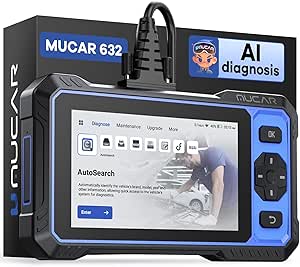 5. MUCAR 632 EliteBroad-service touchscreen diagnostics 5. MUCAR 632 EliteBroad-service touchscreen diagnostics | 8.82"L x 1.26"W x 5.08"H | — | 6.2 in | View on Amazon |
| 6 |  6. TOPDON AD600SWi-Fi-updated system diagnostics 6. TOPDON AD600SWi-Fi-updated system diagnostics | 8.7"L x 1.46"W x 5.23"H | 630 g | 5 in | View on Amazon |
| 7 |  7. Innova 5210Engine checks and maintenance 7. Innova 5210Engine checks and maintenance | 5.99"L x 2.99"W x 0.99"H | — | 2.8 in | View on Amazon |
| 8 |  8. FOXWELL NT301Live-data engine troubleshooting 8. FOXWELL NT301Live-data engine troubleshooting | 8.66"L x 3.15"W x 6.69"H | 0.16 kg | 2.8 in | View on Amazon |
| 9 | 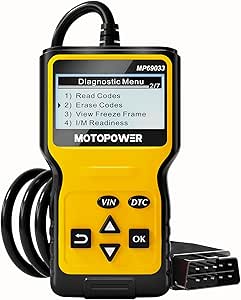 9. MOTOPOWER MP69033Basic OBD-II data and codes 9. MOTOPOWER MP69033Basic OBD-II data and codes | 2.75"L x 0.91"W x 6.02"H | 10.2 oz | 2.7 in | View on Amazon |
| 10 | 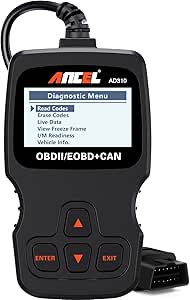 10. ANCEL AD310Basic Ford engine-code checks 10. ANCEL AD310Basic Ford engine-code checks | 8.9"L x 6.9"W x 1.4"H | — | 2.4 in | View on Amazon |
Detailed Reviews: Best Scan Tool For Ford
#1 · Best Overall
1. OBDLink EX
- Dimensions: 3.5"L x 1"W x 1.8"H
Best for: FORScan-focused Ford diagnostics.
Why it ranks #1: Designed for FORScan and recommended by its team, it supports Ford protocols and switches across HS-CAN, MS-CAN, and J1850 networks.
An electronic switch that moves between Ford network buses lets the OBDLink EX connect FORScan to HS-CAN, MS-CAN, and J1850 systems without a manual toggle. The FORScan team recommends this adapter, making it a focused option for owners who want software-based access to Ford diagnostics.
The EX is custom-designed for FORScan and supports Ford protocols, modules, and advanced software functions, so it suits buyers seeking more than basic engine-code reading. Its electronic switching accesses CAN buses simultaneously and shifts between HS-CAN, MS-CAN, and J1850 Ford networks, removing the manual switching step. OBDLink lists throughput up to 20 times faster than toggle-switch adapters, which can speed data transfer during a FORScan session. This workflow depends on FORScan for Windows.
- Custom-designed for use with FORScan
- Supports Ford protocols, modules, and advanced FORScan features
- Electronic switching between Ford network buses
- Throughput listed as up to 20 times faster than toggle-switch adapters
- FORScan functionality depends on using FORScan software for Windows.
Skip it if you want a self-contained screen rather than a Windows adapter; the ANCEL FD700 is a handheld Ford, Lincoln, and Mercury scanner.
Pick the OBDLink EX if you use FORScan on Windows and want access to Ford networks, modules, and advanced functions through an adapter. Its fit depends on your willingness to run PC software rather than work from a standalone scanner.
Full product details
| Brand | OBDLink |
|---|---|
| Included Components | Quick Start Guide, Scanner |
| Dimensions | 3.5"L x 1"W x 1.8"H |
| Manufacturer | OBD Solutions |
| Part Number | 429101 |
| Model Number | EX101 |
Listed on Amazon as: OBDLink EX FORScan OBD Adapter
View on Amazon#2 · Best Ford Coverage
2. ANCEL FD700
- Weight: 1.3 lb
- Screen Size: 2.8 in
Best for: Ford-family system diagnostics.
Why it ranks #2: Specifically listed for Ford, Lincoln, and Mercury, with full-system functions including ABS, SRS, battery registration, and oil reset.
Coverage for Ford, Lincoln, and Mercury paired with full-system diagnostics makes the ANCEL FD700 a more expansive handheld option than an engine-only reader. Its listed functions include ABS, SRS, SAS, battery registration, and several reset services, helping owners address multiple maintenance tasks from one scanner.
The FD700’s full-system positioning and named functions—such as ABS, SRS, SAS, BMS, and EPB—give Ford-family owners access to diagnostics beyond engine codes. Its listed oil reset, TPMS, battery registration, and regeneration functions can also support specific maintenance workflows when those functions apply to the vehicle. The 2.8-inch screen keeps scanning on the handheld unit. Coverage is identified for Ford, Lincoln, and Mercury, rather than presented as a universal all-makes tool.
- Ford, Lincoln, and Mercury vehicle focus
- Full-system diagnostic positioning
- Lists ABS, SRS, SAS, and BMS functions
- Lists oil reset, TPMS, battery registration, and EPB functions
- Its stated vehicle focus is Ford, Lincoln, and Mercury rather than all makes.
Skip it if you need a scanner explicitly presented for all makes; the Innova 5610 offers OBD2 and OEM live-data functions.
The FD700 fits Ford, Lincoln, and Mercury owners who want a handheld scanner with named system and maintenance functions beyond engine codes. Check that its listed functions match your vehicle and intended service tasks.
Full product details
| Brand | ANCEL |
|---|---|
| Item Weight | 1.3 pounds |
| Manufacturer | ANCEL |
| Part Number | FD700 |
| Model Number | FD700 |
| Screen Size | 2.8 inches |
| Additional Information | Important information |
Listed on Amazon as: ANCEL FD700 Ford Lincoln Mercury OBD2 Scanner, Full System Automotive Car Code Reader with All Functions, Including Battery Registration ABS SRS SAS BMS Oil Reset TPMS Engine IQA EPB Regen
View on Amazon#3 · Best Bidirectional
3. Innova 5610
- Dimensions: 7"L x 3.75"W x 1"H
- Weight: 1.3 lb
- Screen Size: 3.5 in
Best for: Bidirectional repair workflows.
Why it ranks #3: Offers bidirectional functionality alongside OBD2 and OEM live data, plus listed ABS and SRS code access and oil reset.
Bidirectional controls let the Innova 5610 do more than display diagnostic information, supporting repair workflows that call for active tests on compatible systems. It also combines OBD2 and OEM live data with listed ABS and SRS code access, making it a broad handheld choice for Ford owners seeking multiple diagnostic views.
The 5610 combines OBD2 and OEM live data with bidirectional functionality, giving owners a way to inspect vehicle data and use active controls during troubleshooting. Its listed functions also include reading and erasing ABS and SRS codes, plus oil-life reset, battery-system checks, and drive-cycle procedures. The 3.5-inch screen and included OBD2 cable, protective boot, and soft storage pouch support handheld use and storage. These functions make it more than a basic engine-code reader, though vehicle-specific coverage still matters.
- Bidirectional scan-tool functionality
- Access to OBD2 and OEM live data
- Lists ABS and SRS code reading and erasing
- Includes a protective boot and soft storage pouch
- The supplied details do not specify Ford-specific module coverage.
Skip it if you require confirmed Ford module coverage before choosing; the OBDLink EX is explicitly built for FORScan and Ford protocols.
Consider the Innova 5610 if you value bidirectional functions, live data, and several listed service tasks in a handheld scanner. Its supplied details do not spell out Ford-specific module coverage, so that distinction matters for specialized Ford work.
Full product details
| Brand | Innova |
|---|---|
| Included Components | Code Reader with Protective Boot, Manual, OBD2 Cable, Soft Pouch for Storage, USB Cable |
| Dimensions | 7"L x 3.75"W x 1"H |
| Item Weight | 1.3 pounds |
| Manufacturer | Innova Electronics Corporation |
| Part Number | 5610 |
| Model Number | 5610 |
| Screen Size | 3.5 inches |
| Additional Information | Important Information Proposition 65 Warning for California Consumers WARNING: This product can expose you to chemicals including diisononyl phthalate (DINP) which is known to the State of California to cause cancer. For more information go to www.P65Warnings.ca.gov |
Listed on Amazon as: Innova 5610 OBD2 Bidirectional Scan Tool – Understand Your Vehicle, Pinpoint What's Wrong, and Complete Your Repairs with Less Headache, Updates Included, US-Based Technical Support
View on Amazon#4 · Largest Screen
4. TOPDON AD900 Lite
- Dimensions: 11.53"L x 5.39"W x 8.58"H
- Weight: 4.8 lb
- Screen Size: 8 in
Best for: Wireless bidirectional service work.
Why it ranks #4: Its 8-inch touchscreen and listed bidirectional control suit buyers wanting a large display and active diagnostic functions.
An 8-inch touchscreen and 33-foot wireless diagnostic range give the TOPDON AD900 Lite room to support work around the vehicle, while bidirectional control lets it send commands to vehicle components. Its large display and wireless operation suit owners who want to move beyond a cable-bound diagnostic position.
The AD900 Lite combines bidirectional control with Bluetooth 5.0 wireless diagnosis, so a user can command components and move around the vehicle within the listed 33-foot range. Its 8-inch touchscreen gives diagnostic work a large display, while the 10,000mAh battery is specified for up to 12 hours of continuous operation. Android 11.0 and a faster CPU are also listed. Battery testing is optional, so buyers should distinguish that add-on capability from the scanner’s included functions.
- Bidirectional control sends commands to components
- Wireless diagnosis with Bluetooth 5.0
- 33-foot wireless diagnostic range
- 8-inch touchscreen and battery specified for up to 12 hours
- Battery testing is optional rather than included as a standard function.
Skip it if you need battery testing included as standard; the Innova 5210 lists a battery tester among its functions.
Choose the AD900 Lite for wireless bidirectional work where its large screen, 33-foot range, and long listed operating time suit the workflow. Battery testing is optional, and the supplied details do not specify Ford-only coverage.
Full product details
| Brand | TOPDON |
|---|---|
| Included Components | OBD2 SCANNER |
| Dimensions | 11.53"L x 5.39"W x 8.58"H |
| Item Weight | 4.8 pounds |
| Manufacturer | TOPDON |
| Part Number | AD900; |
| Manufacturer Warranty Description | 2 Year Manufacturer |
| Model Number | 900L-G |
| Screen Size | 8 inches |
Listed on Amazon as: TOPDON AD900 Lite OBD2 Scanner, Bidirectional Scan Tool, 8" Large Screen
View on Amazon#5
5. MUCAR 632 Elite
- Dimensions: 8.82"L x 1.26"W x 5.08"H
- Screen Size: 6.2 in
Best for: Broad-service touchscreen diagnostics.
Why it ranks #5: Lists bidirectional control, 15 reset services, CANFD, and AutoVIN, offering broad functions, though Ford-specific coverage is not detailed.
A 6.2-inch touchscreen pairs with bidirectional diagnostics and 15 reset services on the MUCAR 632, giving Ford owners a broad set of diagnostic and maintenance workflows in one scanner. Listed functions include TPMS, EPB, BMS, SAS, brake, and throttle services.
The 632’s bidirectional capability supports command-based diagnostic work, while its 15 reset services cover named maintenance areas such as oil, TPMS, EPB, BMS, SAS, brake, and throttle. AutoVIN and CANFD are also identified in the product title, adding vehicle-identification and network features to its broader toolset. The 6.2-inch screen offers a larger interface for navigating these functions. Since the supplied details do not specify Ford-only coverage, check the relevance of each listed service for your intended vehicle and task.
- Bidirectional diagnostic functionality
- 15 listed reset services
- 6.2-inch touchscreen
- AutoVIN and CANFD identified in product details
- The supplied details do not specify Ford-only system coverage.
Skip it if you want a tool explicitly tailored to Ford and FORScan; the OBDLink EX is designed for those protocols and modules.
The MUCAR 632 suits owners who want a large touchscreen, bidirectional functions, and numerous reset services in one diagnostic tool. Its listed features are broad rather than explicitly Ford-specific, so match the services to your vehicle and workflow.
Full product details
| Brand | mucar |
|---|---|
| Included Components | 1* Quick Start Guide, 1*Diagnostic Cable, 1*MUCAR 632 OBD2 Scanner, 1*Type-C Cable |
| Dimensions | 8.82"L x 1.26"W x 5.08"H |
| Manufacturer | mucar |
| Part Number | mucar 632 |
| Manufacturer Warranty Description | 12 Months |
| Model Number | mucar 632 obd2 scanner |
| Screen Size | 6.2 inches |
#6
6. TOPDON AD600S
- Dimensions: 8.7"L x 1.46"W x 5.23"H
- Weight: 630 g
- Screen Size: 5 in
Best for: Wi-Fi-updated system diagnostics.
Why it ranks #6: Covers engine, ABS, SRS, and transmission diagnostics and lists lifetime software updates, but the supplied details do not specify Ford protocols.
Free lifetime software updates over Wi-Fi are the AD600S’s defining feature, helping owners keep its diagnostic software current without recurring update fees. The title identifies engine, ABS, SRS, and transmission diagnosis, making it a candidate for Ford owners seeking coverage beyond engine codes.
The AD600S is described as an engine, ABS, SRS, and transmission diagnostic tool, giving it a broader stated scope than an engine-only reader. Its free lifetime software updates arrive over Wi-Fi, which supports software maintenance without a recurring update subscription. Wi-Fi is required for initial setup; after setup, most basic diagnostics can be used without it. This matters for owners planning their first-use workflow and later use away from a network. The supplied details do not specify Ford-only functions.
- Engine, ABS, SRS, and transmission diagnostics identified
- Free lifetime software updates
- Updates delivered via Wi-Fi
- Most basic diagnostics can be used offline after setup
- Wi-Fi is required for initial setup.
Skip it if you cannot provide Wi-Fi for initial setup; the ANCEL FD700 lists Ford, Lincoln, and Mercury vehicle coverage.
The AD600S fits owners seeking listed engine, ABS, SRS, and transmission diagnostics plus ongoing Wi-Fi software updates. Plan for Wi-Fi during initial setup, and note that the supplied details do not identify Ford-specific functions.
Full product details
| Brand | TOPDON |
|---|---|
| Included Components | AD600S OBD2 Scanner |
| Dimensions | 8.7"L x 1.46"W x 5.23"H |
| Item Weight | 630 g |
| Manufacturer | TT TOPDON |
| Part Number | ArtiDiag600S |
| Manufacturer Warranty Description | 1 Year Warranty |
| Model Number | AD600S |
| Screen Size | 5 inches |
Listed on Amazon as: TOPDON AD600S OBD2 Scanner, Engine ABS SRS Transmission Diagnostic Tool
View on Amazon#7
7. Innova 5210
- Dimensions: 5.99"L x 2.99"W x 0.99"H
- Screen Size: 2.8 in
Best for: Engine checks and maintenance.
Why it ranks #7: Combines engine codes, live data, battery testing, and oil reset; its listed vehicle examples do not specifically establish Ford coverage.
A battery tester and oil reset join engine-code reading on the Innova 5210, giving Ford owners several maintenance-oriented functions in one handheld tool. Its 2.8-inch screen and attached OBD2 cable keep the diagnostic workflow centered on the scanner rather than a separate display.
The 5210 pairs engine-code reading with live data, a battery test, and an oil reset, so owners can use one tool for several listed checks and service tasks. Bluetooth compatibility with America’s Top Car Repair App adds an app-connected option to the handheld workflow. Its attached OBD2 cable provides the vehicle connection, while the 2.8-inch screen displays scanner information. The supplied compatibility details list many OBD2-compliant vehicles, but do not name Ford-specific modules or advanced Ford functions.
- Reads engine codes and displays live data
- Includes a battery tester
- Offers an oil reset function
- Bluetooth compatible with America’s Top Car Repair App
- The supplied details do not identify Ford-specific module or advanced Ford functions.
Skip it if you need confirmed Ford network access through FORScan; the OBDLink EX supports Ford protocols and buses.
Choose the 5210 for engine checks, live data, battery testing, or oil resets in a handheld format, with app compatibility as another option. Its supplied details do not establish Ford-specific module coverage for advanced diagnosis.
Full product details
| Brand | Innova |
|---|---|
| Included Components | Code Reader with attached OBD2 Cable, Quick Start Guide |
| Dimensions | 5.99"L x 2.99"W x 0.99"H |
| Manufacturer | Innova Electronics |
| Part Number | 5210 |
| Model Number | 5210 |
| Screen Size | 2.8 inches |
| Additional Information | Important Information Proposition 65 Warning for California Consumers WARNING: This product can expose you to chemicals including diisononyl phthalate (DINP) which is known to the State of California to cause cancer. For more information go to www.P65Warnings.ca.gov |
Listed on Amazon as: Innova 5210 OBD2 Scanner & Engine Code Reader, Battery Tester, Live Data, Oil Reset, Car Diagnostic Tool for Most Vehicles, Bluetooth Compatible with America's Top Car Repair App
View on Amazon#8
8. FOXWELL NT301
- Dimensions: 8.66"L x 3.15"W x 6.69"H
- Weight: 0.16 kg
- Screen Size: 2.8 in
Best for: Live-data engine troubleshooting.
Why it ranks #8: A 2.8-inch OBD2 reader with live data for check-engine diagnostics, but its listed functions are less extensive than Ford-focused options.
Live-data display is the FOXWELL NT301’s defining draw for owners investigating a Ford check-engine light: it adds operating information to the basic code-reader workflow. The 2.8-inch screen and included USB cable give it a handheld diagnostic format for engine-focused OBD-II checks.
The NT301 is identified as an OBD2 diagnostic code reader for the check-engine light, with live data as a key feature. That combination lets an owner view current vehicle information alongside engine-code diagnosis, rather than relying on a code alone. Its 2.8-inch screen provides the display, and the included USB cable supports a computer connection. The supplied product details focus on OBD-II engine diagnostics, so buyers seeking named Ford-specific module or reset functions should weigh that narrower stated scope.
- Live-data capability
- Check-engine-light diagnostic focus
- 2.8-inch screen
- Includes a USB cable
- The supplied feature details center on check-engine diagnostics rather than named Ford-specific systems.
Skip it if you need named Ford modules and advanced FORScan functions; the OBDLink EX supports Ford protocols, modules, and FORScan.
The NT301 suits owners who want live data alongside check-engine code diagnosis in a handheld OBD2 reader. Its supplied details emphasize engine diagnostics, so it is a less direct match for buyers seeking broader, specifically documented Ford-system functions.
Full product details
| Brand | FOXWELL |
|---|---|
| Included Components | 1*NT301 obd2 scanner, 1* usb cable, 1* quick reference guide |
| Dimensions | 8.66"L x 3.15"W x 6.69"H |
| Item Weight | 0.16 kg |
| Manufacturer | FOXWELL |
| Part Number | NT301 |
| Manufacturer Warranty Description | 12 Months |
| Model Number | NT301 |
| Screen Size | 2.8 inches |
| Additional Information | Important information |
Listed on Amazon as: FOXWELL NT301 OBD2 Scanner Live Data Professional Mechanic OBDII Diagnostic Code Reader Tool for Check Engine Light
View on Amazon#9
9. MOTOPOWER MP69033
- Dimensions: 2.75"L x 0.91"W x 6.02"H
- Weight: 10.2 oz
- Screen Size: 2.7 in
Best for: Basic OBD-II data and codes.
Why it ranks #9: Reads and erases engine codes and displays live data across supported OBD II protocols, but no Ford-specific module access is listed.
A built-in DTC lookup library helps the MOTOPOWER MP69033 connect an engine fault code with a possible cause, while its real-time data view adds context. For Ford owners with OBD-II-compliant vehicles, it brings several routine engine-diagnostic functions together on a compact handheld scanner.
The MP69033 can read and erase codes, show freeze-frame information, check I/M readiness, and display data flow and real-time curves. Those features give an owner more context for an engine warning than code retrieval alone. Its listed vehicle information includes speed, engine load, coolant temperature, and engine speed, while the built-in DTC lookup library helps interpret codes. The scanner supports nine protocols and is listed for most 1996 US-based vehicles, making it a general OBD-II option rather than a specifically Ford-focused tool.
- Built-in OBD-II DTC lookup library
- Reads and erases fault codes
- Shows freeze-frame data and I/M readiness
- Displays real-time curves and engine information
- It is presented as a general OBD-II scanner, not a Ford-specific system tool.
Skip it if you need Ford module-level functions rather than general OBD-II data; the OBDLink EX is designed for FORScan and Ford networks.
The MP69033 fits Ford owners looking for general OBD-II code reading, readiness checks, and engine data in one compact scanner. Choose a Ford-specific adapter instead when your work calls for FORScan or access beyond general OBD-II functions.
Full product details
| Brand | MOTOPOWER |
|---|---|
| Included Components | battery |
| Dimensions | 2.75"L x 0.91"W x 6.02"H |
| Item Weight | 10.2 ounces |
| Manufacturer | MOTOPOWER |
| Part Number | MP69033 |
| Manufacturer Warranty Description | 30-day |
| Model Number | MP69033 |
| Screen Size | 2.7 inches |
Listed on Amazon as: MOTOPOWER MP69033 Car OBD2 Scanner Code Reader Engine Fault Scanner CAN Diagnostic Scan Tool for All OBD II Protocol Cars Since 1996, Yellow
View on Amazon#10
10. ANCEL AD310
- Dimensions: 8.9"L x 6.9"W x 1.4"H
- Screen Size: 2.4 in
Best for: Basic Ford engine-code checks.
Why it ranks #10: A basic reader for 1996-or-newer OBD2 vehicles that reads and clears engine codes; it explicitly does not support ABS or transmission systems.
A dedicated engine-code reader keeps the ANCEL AD310 focused on reading and clearing check-engine trouble codes, making it a straightforward choice for basic OBD-II checks on a supported Ford. Its 2.4-inch screen presents information on the scanner itself, without requiring a separate diagnostic system for those engine-code tasks.
The AD310 supports OBD-II vehicles from 1996 onward, giving owners of qualifying Ford models a way to read and clear engine codes through the vehicle’s OBD-II connection. Its 2.4-inch screen keeps the results on the handheld unit, while the scanner needs no charger or adapter. The key boundary is system coverage: the supplied information identifies it as an engine-code reader, not a tool for ABS, transmission, or other systems. That makes it better suited to check-engine troubleshooting than broader vehicle diagnosis.
- Reads and clears engine fault codes
- Supports OBD-II vehicles from 1996 onward
- 2.4-inch screen displays scanner information
- No charger or adapter needed
- It does not support ABS, transmission, or other non-engine systems.
Skip it if you need Ford module or ABS diagnostics; the OBDLink EX supports Ford protocols, modules, and advanced FORScan functions.
Choose the AD310 for a supported Ford when your priority is basic engine-code reading and clearing on a simple handheld. Skip it if your diagnostic work extends beyond engine codes to ABS, transmission, or other vehicle systems.
Full product details
| Brand | ANCEL |
|---|---|
| Included Components | (No charger/adapter needed), 1* AD310 OBD2 Scanner, 1* User's Manual |
| Dimensions | 8.9"L x 6.9"W x 1.4"H |
| Manufacturer | ANCEL |
| Part Number | AD310 |
| Manufacturer Warranty Description | For AD310 OBD2 scanner |
| Model Number | AD310 |
| Screen Size | 2.4 inches |
| Additional Information | Important information |
Listed on Amazon as: ANCEL AD310 Classic Enhanced Universal OBD II Scanner Car Engine Fault Code Reader CAN Diagnostic Scan Tool, Read and Clear Error Codes for 1996 or Newer OBD2 Protocol Vehicle (Black)
View on AmazonWhy a check-engine reader may fall short on a Ford
A basic OBD2 engine reader may not reach the Ford modules you need, so match tool scope to the fault before buying. ANCEL AD310 explicitly limits its functions to engine codes and says it does not support ABS, transmission, or other systems. By contrast, OBDLink EX is designed for FORScan and lists access to Ford protocols, modules, and advanced features; ANCEL FD700 names ABS, SRS, and other system functions.
These are different levels of coverage, not interchangeable descriptions. A check-engine warning may call for engine-code reading, while an ABS or airbag issue calls for relevant system access.
The product listings do not identify exact supported Ford models, years, or module availability, so verify those details for your vehicle and intended repair. Also distinguish a code reader from a bidirectional tool: a listed bidirectional function does not, by itself, establish that every Ford component can be commanded.
Plan for the adapter, software, and vehicle connection
The connection method is a practical compatibility trap: an adapter can require a separate computer or software rather than operating as a standalone handheld scanner. OBDLink EX is expressly designed to take advantage of FORScan for Windows, so buyers need to account for that setup rather than treating it like a screen-equipped reader. The ANCEL FD700, Innova 5610, and basic readers are listed as handheld scanners with their own screens.
OBDLink EX’s electronic switch moves between HS-CAN, MS-CAN, and J1850 Ford networks, while its listing contrasts that with toggle-switch adapters. That makes the connection design relevant if you need access across Ford networks.
The supplied data does not state which exact vehicle years or modules are supported in every configuration. Before purchase, confirm the vehicle’s compatibility, required software, connection hardware, and whether the intended task needs read-only diagnostics or an active control.
How to Choose a Ford Scan Tool
Ford-specific network and software support
Look first for explicit Ford network and software support if your goal goes beyond generic engine codes. OBDLink EX is designed for FORScan on Windows, supports Ford protocols and modules, and switches among HS-CAN, MS-CAN, and J1850 networks. ANCEL FD700 is identified for Ford, Lincoln, and Mercury and lists full-system functions, but the supplied details do not specify the same network switching.
General OBD2 readers such as ANCEL AD310 instead focus on engine codes. FORScan users who need Ford network access should favour OBDLink EX; buyers wanting a handheld scanner with listed Ford-family fit should consider FD700.
Confirm exact vehicle and year support before choosing.
Diagnostic systems and active controls
Choose a scanner based on the systems and actions you need, not just its ability to read engine codes. ANCEL AD310 is explicitly engine-only, while ANCEL FD700 lists ABS, SRS, battery registration, and other functions. Innova 5610 includes ABS and SRS read/erase, live data, and oil reset, and the TOPDON AD900 Lite lists bidirectional control.
The MUCAR 632 lists 15 reset services and bidirectional functionality. For a basic check-engine investigation, a narrower reader may be enough; for module diagnostics, resets, or active commands, favour a model that lists the specific function.
Broad feature lists do not guarantee support for every Ford model, so confirm vehicle-specific coverage and the desired operation.
Screen and operating format
Consider whether you want a standalone handheld display or a computer-based adapter. OBDLink EX is a compact adapter designed for use with FORScan for Windows, while the handheld choices include listed screen sizes from 2.4 inches on ANCEL AD310 to 8 inches on TOPDON AD900 Lite. ANCEL FD700, FOXWELL NT301, and Innova 5210 each list 2.8-inch screens; Innova 5610 lists 3.5 inches, and TOPDON AD600S lists 5 inches.
A larger display may suit buyers who want to view scanner information on the device, while OBDLink EX favours buyers prepared to use a Windows setup. Screen size alone does not establish readability or ease of use.
Which Ford Scan Tool Should You Choose?
For FORScan use and Ford network access, choose OBDLink EX: its listed support covers Ford protocols and multiple Ford networks. If you want a handheld scanner specifically identified for Ford, Lincoln, and Mercury, ANCEL FD700 is the clearest alternative, with full-system functions listed. Choose Innova 5610 if bidirectional capability, OEM live data, and listed ABS and SRS access are priorities.
TOPDON AD900 Lite fits buyers who want an 8-inch screen and bidirectional control. For a basic engine-code task, FOXWELL NT301 or ANCEL AD310 offers a narrower OBD2 approach; note that AD310 explicitly excludes ABS and transmission.
Confirm exact Ford model-year and function compatibility before ordering, especially for module-level work.
Frequently Asked Questions
Will a FORScan adapter work with my specific Ford model and model year?
Compatibility depends on the exact vehicle and the functions you want to use. OBDLink EX is designed for FORScan and supports Ford protocols and multiple Ford networks, but confirm your Ford’s model year, protocols, and module access before ordering. Check FORScan compatibility information for your vehicle, especially if you need module-level functions.
What can I safely do with bidirectional controls on a Ford?
Bidirectional controls can command supported vehicle systems, but available actions depend on the tool and vehicle. Use them only for a function you understand, follow the tool’s instructions, and keep people clear of moving parts. Confirm the exact Ford compatibility and procedure before activating a control; do not treat a command as a repair.
Do I need a Windows computer or phone to use a Ford scan tool?
It depends on the tool. OBDLink EX is an adapter for FORScan and is the choice here for use with FORScan on Windows. Several other listed products are standalone scanners with their own screens.
Check each product’s requirements and your intended functions before buying; the titles do not establish compatibility with every phone or computer.
Which listed scanner is a standalone option for Ford-family vehicles?
ANCEL FD700 is identified for Ford, Lincoln, and Mercury and lists full-system functions, including ABS and SRS. It is a strong alternative if you want a handheld scanner rather than a FORScan adapter. Verify that the specific function you need is supported for your vehicle before ordering.
What should I check before using a scanner for ABS or other modules?
Confirm that the scanner supports your exact vehicle and the module-level function you need. The listed products differ: for example, ANCEL AD310 explicitly excludes ABS and transmission, while FD700 lists ABS and SRS functions. Product descriptions alone do not confirm coverage for every model or year, so check compatibility before purchase.
Final Words
For FORScan on Windows and broad access to Ford networks, choose OBDLink EX; its electronic switch avoids manual network switching. If you want a standalone Ford-family scanner with listed full-system functions, consider ANCEL FD700. Innova 5610 suits buyers prioritizing bidirectional capability, OEM live data, and listed ABS and SRS access.
For basic engine-code tasks, FOXWELL NT301 or ANCEL AD310 is narrower. Before ordering, confirm compatibility with your exact Ford and intended functions.